How to Split Orders on Shopify
Master the art of splitting Shopify orders efficiently




Published June 26, 2024.

When managing an online store on Shopify, understanding the intricacies of order processing can significantly impact your efficiency and customer satisfaction. One technique that can assist you with managing supply and demand is order splitting. But what is it, and why should you, as a Shopify merchant, care about it? Let's dive in.
Understanding Order Splitting and Its Benefits
If you've been in the e-commerce realm for some time, you might have come across the following situations:
- A single order that contains products from different vendors
- An order that needs to be sent in multiple shipments
- An order containing multiple items, where some are out-of-stock
One way to deal with these situations is to implement order splitting. On Shopify, order splitting refers to dividing an order into multiple shipments, and it is often implemented due to products being housed in different locations or specific delivery preferences. It is also an excellent option for when you've hit an inventory management snag.
I once had an order with products sourced from three different vendors. Rather than waiting to consolidate everything and risk delays, I split the order by vendor. The result? Faster delivery times and a very satisfied customer!
Order splitting isn't just a fancy term; it's a practical solution. Here's why:
- Faster Delivery Times: Ship from the nearest location to the customer. Speed equals satisfaction.
- Efficient Stock Handling: Ship available products ASAP. Reduce waiting and inventory turnover.
- Advantages for Multi-Vendor Businesses: Ship from different vendors directly. Save costs and time.
Step-by-Step Guide to Shopify Split Orders
If you need to split order fulfillment into two shipments, Shopify makes it easy for you. Here's how to do it in a few simple steps:
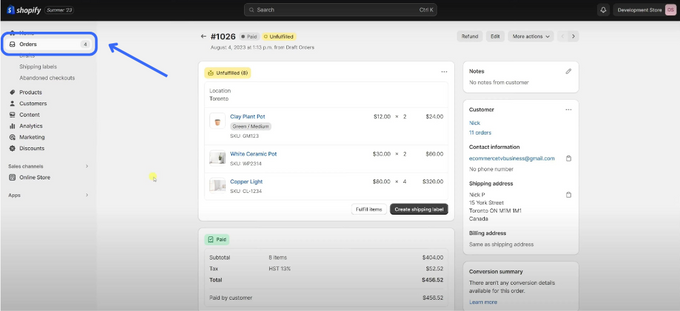
- Log in to your Shopify dashboard and go to Orders.
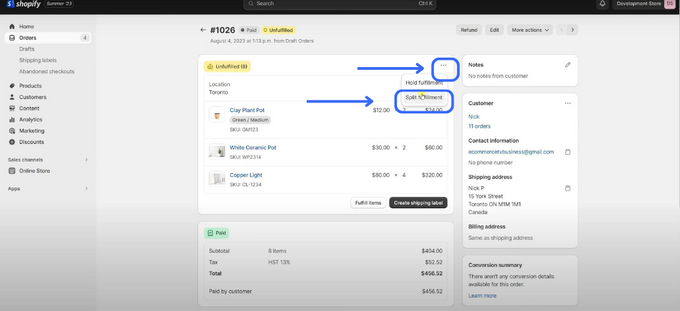
- In the order details page, click on the ellipsis (the three dots) and select Split fulfillment.
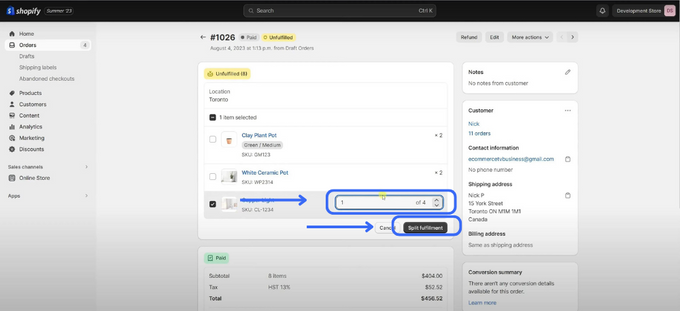
- Locate the order you wish to split and checkmark it. Then, specify the number of items you want to separate from that order in the box. To illustrate, you might want to split 1 out of the 4 items from the order.
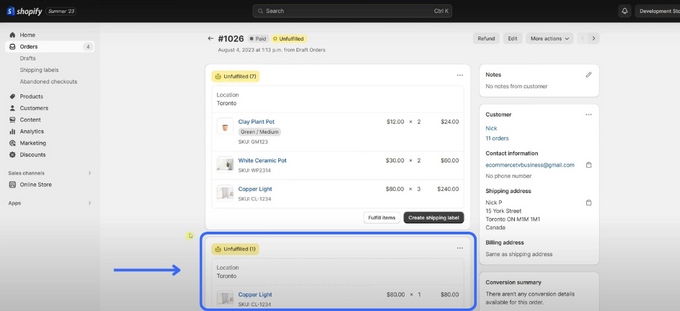
- When you're done, click on the Split fulfillment button to confirm. You'll see two separate shipments on the same order, each with its own tracking number and fulfillment status.
Splitting Orders, Multiplying Efficiency
Splitting orders on Shopify isn't just about dividing fulfillment—it's about optimizing your operations for efficiency and meeting customer demand. Embracing this feature can significantly streamline your deliveries, especially when juggling products from multiple suppliers. As you refine your e-commerce strategy, remember this: sometimes, the simplest tweaks, like order splitting, can yield the most impactful results. Dive in and see the difference for yourself. Happy selling!