What Is Shopify SKU? Definition & Example






Published July 3, 2024.

If you're an e-commerce business owner looking to manage your inventory more efficiently, you've probably heard of SKU—but what exactly is it, and how can it benefit your business?
The Shopify SKU (Stock Keeping Unit) is a unique code made up of numbers and letters assigned to each product in your store.
Think of an SKU as your product's secret code that only you and your inventory system can decipher. SKUs are like nametags for your stock to help you keep track of it and organize your products more effectively.
» Need an easy way to track your Shopify inventory? Follow these easy steps
How Does an SKU Work?
Navigating SKUs can seem a little confusing at first, but it's actually quite simple once you understand how they work. The letters and numbers in the SKU provide important information about your product, such as the product code, color, size, and any other relevant data that you want to track.
To help you get the hang of your product SKUs, we'll take a look at a specific SKU and its components.
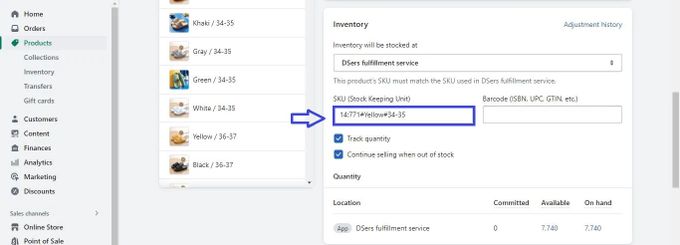
Example:
Shopify SKU: 14:771#Yellow#34-35
This SKU can be broken down into different elements that represent the following:
- 14:771 – Product variant code
- #Yellow – Product color
- #34-35 – The size of the product
To make the most of your SKUs, it's important to follow the best practices when assigning them. For instance, you can assign numbers to products in a specific order to better track your stock. This can help you easily identify obsolete inventory or products that are running low and need to be restocked.
» Learn how to create SKU numbers for your Shopify store
Adding SKUs to Product Variants
SKUs can also be added to product variants to mark each unique variant. For example, if you have a T-shirt available in different sizes and colors, you can add a different SKU for each variant to easily track your inventory and fulfill orders more accurately.
To add SKUs to your product variants, simply go to the product page and scroll down to the Variants section. From there, you can add SKUs to each variant by clicking the Edit button next to each option. You can also edit SKUs in bulk using a CSV file.
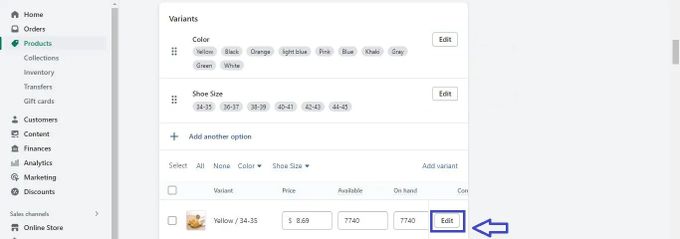
By following the best practices for SKUs and adding them to your product variants, you can streamline your inventory management and order fulfillment.
» Are some of your variants out of stock? Here's how to hide them
Streamline Your Product Management With SKUs
While Shopify SKUs may seem like just a string of letters and numbers, they can actually make a big difference in how you manage your online store. By assigning unique codes to all your products and variants, you can easily track your inventory levels, monitor your sales performance, and avoid stockouts or order mix-ups.
With these benefits in mind, paying special attention to product SKUs can help improve your business processes and boost your store's bottom line.
» Discover how to use SKUs for better inventory management in Shopify